
Title
Bluepill STM32F103 MCU
What It Is
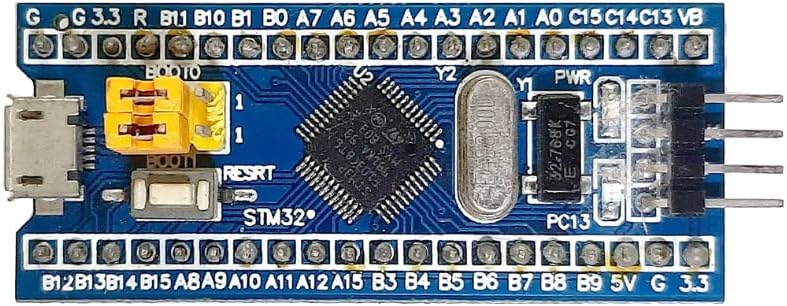
The Bluepill is a small development board built around an STMicroelectronics STM32F103 ARM Cortex-M3 microcontroller. In this course, it is the main brain of the system.
What It Does In This Project
- runs the course firmware
- talks to sensors and displays
- responds to USB and Bluetooth commands
- manages timers, GPIO, PWM, and communication buses
Origins And Background
The STM32 family comes from STMicroelectronics. It became very popular because it offered a lot of capability for a low cost. The Bluepill board became well known in hobby and education circles because it made ARM microcontrollers cheap and accessible.
How It Communicates
UARTfor HC-05 serial communicationI2Cfor devices like the MPU6050SPIfor devices like the MAX7219USB CDCfor the browser dashboard serial connection- GPIO pins for direct digital input and output
Course Pinout
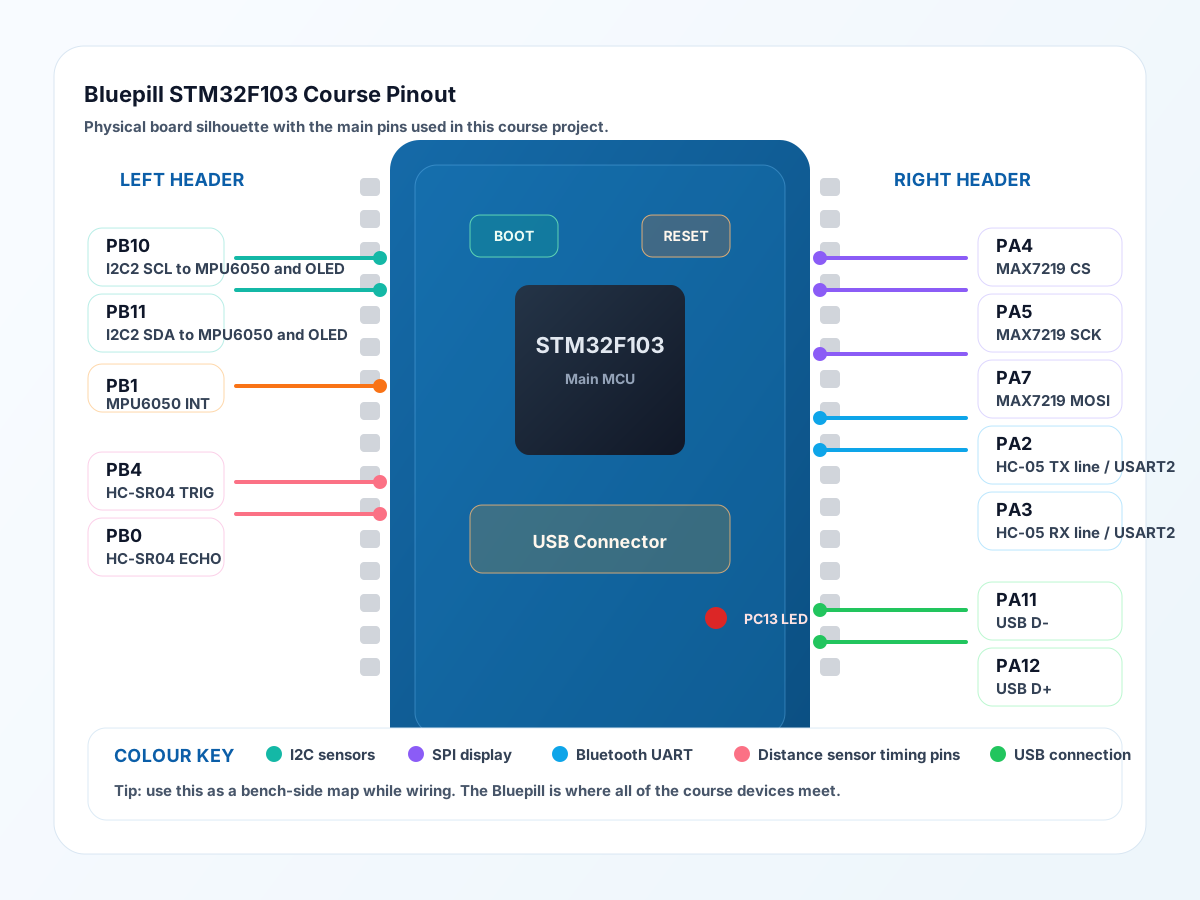
These are the main Bluepill connections used in the course hardware:
PA4:MAX7219 CSPA5:MAX7219 SCKPA7:MAX7219 MOSIPA8:WS2812 RGB matrix datausingTIM1_CH1PA2:HC-05 TXline onUSART2PA3:HC-05 RXline onUSART2PB10:I2C2 SCLforMPU6050andSSD1306 OLEDPB11:I2C2 SDAforMPU6050andSSD1306 OLEDPB1:MPU6050 INTPB4:HC-SR04 TRIGPB0:HC-SR04 ECHOPA11:USB D-PA12:USB D+
This is a good note to keep beside the bench, because the Bluepill is where all the separate device notes come together.
Physical Layer Notes
The MCU sends and receives electrical signals on pins. Some pins are simple on/off digital lines. Others are shared buses with timing rules and special modes.
Why It Matters
This board shows students that a microcontroller is not just “a tiny computer”. It is a computer designed to interact directly with real hardware.
Teaching Focus
- microcontroller vs full computer
- firmware in flash, working data in RAM
- pins, peripherals, and datasheets
- the idea of one chip talking to many devices
Datasheet Navigation Tips
When using the STM32 datasheet or reference manual, look for:
- pinout tables
- memory sizes
- electrical limits
- timer features
- communication peripheral sections
Interesting Detail
The same STM32 chip can blink LEDs, read sensors, talk USB, run timers, and generate PWM all at once because it contains dedicated hardware peripherals for each job.
Good Questions To Ask Students
- Why is a microcontroller better than a full PC for a small robot or gadget?
- Why do we care about which pins can do UART, SPI, or I2C?
- Why does the datasheet matter before wiring something up?