
Title
USB CDC Serial Link
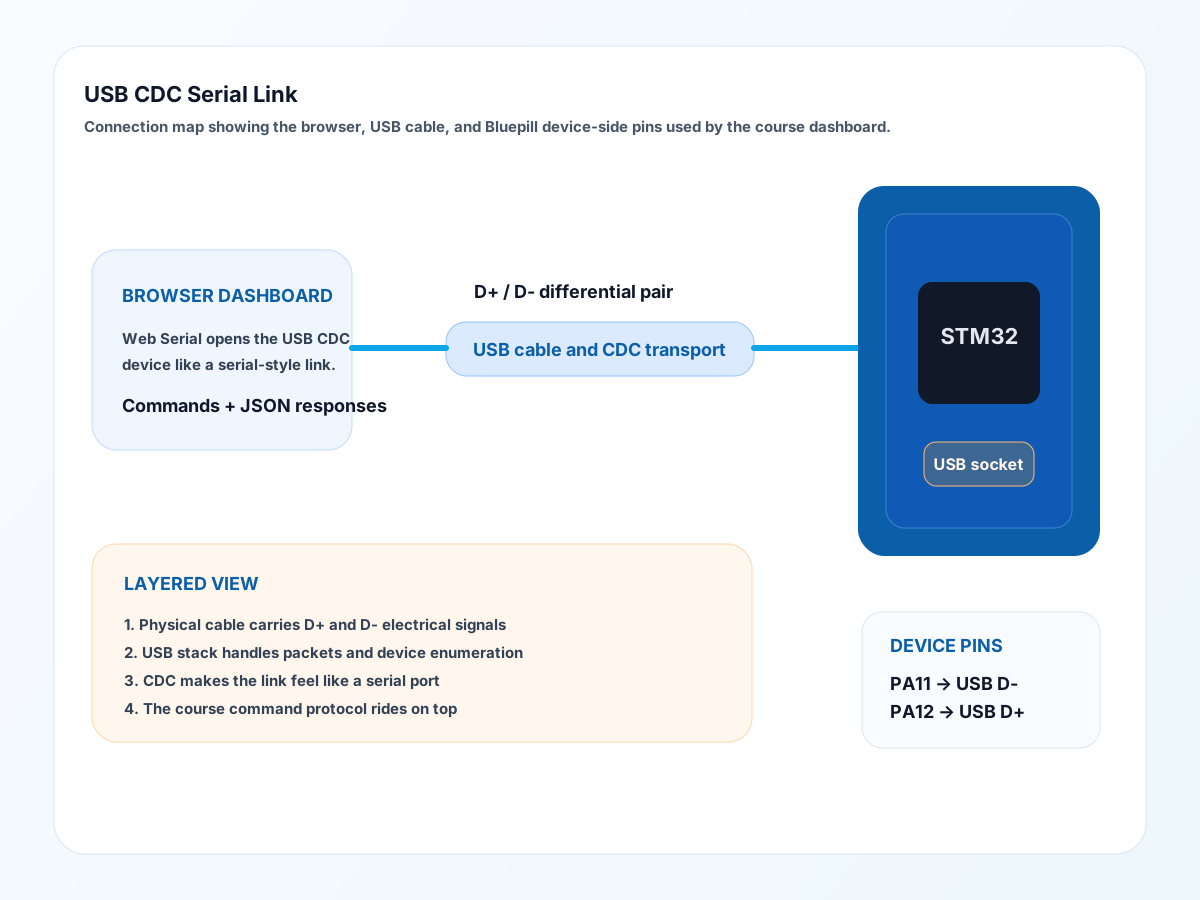
What It Is
USB CDC is a way for a USB device to appear like a serial port to the host computer.
What It Does In This Project
- connects the web dashboard to the Bluepill
- carries the command and response protocol over USB
- lets Web Serial talk to the firmware in the browser
Origins And Background
USB was created to replace many older connector standards with one more unified system. CDC made it possible for devices to present themselves like familiar serial links even though USB is much more complex underneath.
How It Communicates
- the browser uses Web Serial to open the USB CDC port
- the firmware sends and receives text commands and JSON responses
- the USB stack handles packet-level details underneath
Protocol Layer Notes
There are two protocol ideas here:
- USB itself, which is the low-level link standard
- the course command protocol, which is the human-readable command set on top
Physical Layer Notes
USB uses differential signalling on D+ and D-. This is a good place to connect back to twisted pairs, noise rejection, and the physical layer.
Why It Matters
It shows students that one physical cable can carry a sophisticated standard, while our own application protocol can still be simple.
Teaching Focus
- layered protocols
- host and device roles
- text commands over a structured transport
- why secure browser APIs matter
Datasheet And Documentation Tips
For USB work, engineers often need more than one source:
- MCU datasheet
- MCU reference manual
- USB middleware documentation
- class-specific notes for CDC
Interesting Detail
To the student, the link feels like a serial console. Underneath, USB is far more structured and packet-based than old UART serial.
Good Questions To Ask Students
- Why does USB feel simple to use but complex inside?
- What is the difference between USB itself and our course commands?
- Why do layered protocols help engineers?