Circuit Biscuits is built around a simple idea: each small board or module is a biscuit. The Bluepill is one biscuit, the OLED screen is another, and so are the motion sensor, sonar sensor, Bluetooth module, and LED displays.
We call them biscuits because they are small, friendly building blocks you can pick up one at a time. You can learn one biscuit on its own, then combine several on a breadboard to make a real circuit. The name makes the first step feel lighter, but the electronics are real, useful, and connected to the same kinds of ideas found in wider maker and engineering projects.
Circuit Biscuits is not a fixed set with one strict path through it. It is a flexible way of working with affordable modules, a Bluepill board, and browser tools that help children explore what each part does. Some learners will start with lights and displays, some with movement and sensors, and some by following lessons and then changing them.
The Biscuit Jar is the live workspace where those biscuits come together. It is the place for testing parts, sending commands, watching sensor readings, saving your work, and seeing how your setup behaves. Around that, the docs, gallery, breadboard tools, and Kitchen help turn small discoveries into larger builds and better understanding.
Biscuits are small, understandable pieces of real hardware. Some biscuits think, some sense, some glow, some talk, and some display information. One biscuit might measure distance. Another might show text or patterns. Another might let the board speak to a browser or phone. The name keeps things approachable without pretending the electronics are toys.
Calling them biscuits also helps break electronics into manageable ideas. Instead of meeting a whole tangle of wires and unknown parts at once, a child can begin with one biscuit and one job. What does this one sense? What does this one show? What happens when this one is connected? Once that makes sense, the next step is natural: combine two, then three, then build a circuit that actually does something interesting.
The Bluepill is the main biscuit. It is the controller board that runs the firmware, reads sensors, controls displays, and talks to the browser over USB or Bluetooth. The other biscuits plug into it and give it new abilities. In that sense, the Bluepill is the board that listens, decides, and responds, while the other biscuits extend what the whole setup can do.
This matters because it helps children see electronics as a collection of clear roles rather than a mystery. There is a part that senses, a part that thinks, a part that displays, and a part that communicates. Once those roles are visible, circuits stop feeling like magic and start feeling like something you can understand, change, and improve.
Each biscuit is simple enough to understand on its own before it becomes part of a bigger circuit.
These are real, low-cost modules with standard 2.54 mm pins, just like the parts used in real projects.
Combine biscuits in the jar and on the breadboard, follow lessons, or build your own ideas.
The Biscuit Jar is where you try things out. Each panel represents one biscuit or one useful tool. You can light LEDs, draw pixels, check the sonar, read motion, test Bluetooth, and save your workspace. It is the place where the physical board and the browser meet, so what is happening on the desk becomes visible on screen.
That makes the Jar more than a control panel. It is a working bench in browser form. A child can connect the board, choose a biscuit, send a command, watch the result, then try again. A parent or teacher can use it to guide a first test, check whether wiring is working, or return to a saved setup later. It supports quick wins, but it also supports revisiting and refining an idea over time.
The jar idea keeps lessons flexible. A lesson can use one biscuit, a few biscuits, or a larger setup on a breadboard. Some activities begin by exploring a single module in isolation. Others begin with a challenge, then ask the learner to find the right biscuits for the job. In both cases, the Jar gives a common place to inspect, test, and organise what is happening.
It also helps bridge the gap between coding and electronics. A learner can see a trigger, make a change, read a sensor value, or update a display, all while keeping the physical board in front of them. That feedback loop is important: connect something, observe it, understand it, change it, then test it again. The Jar gives that loop a home.
A breadboard is a reusable wiring board. Its holes are connected in hidden strips, so you can plug in wires and biscuit pins without soldering.
For beginners, breadboards can be both exciting and confusing. The parts are real and the wiring is real, but the connections are partly hidden. That is why the Breadboard page matters. It gives learners a way to slow down and see what is going where before they build it for real on the bench.
The Breadboard page helps you plan layouts before building them. You can place biscuits, see connections, and draw wires visually. That makes it easier to answer the kinds of questions that matter when learning electronics: which row is this pin in, where is power coming from, which ground is shared, and what exactly is this sensor connected to?
It also helps with confidence. Instead of pulling everything apart when something does not work, learners can compare the real board with a planned layout, spot what has changed, and correct one thing at a time. That turns mistakes into part of the process rather than the end of the project.
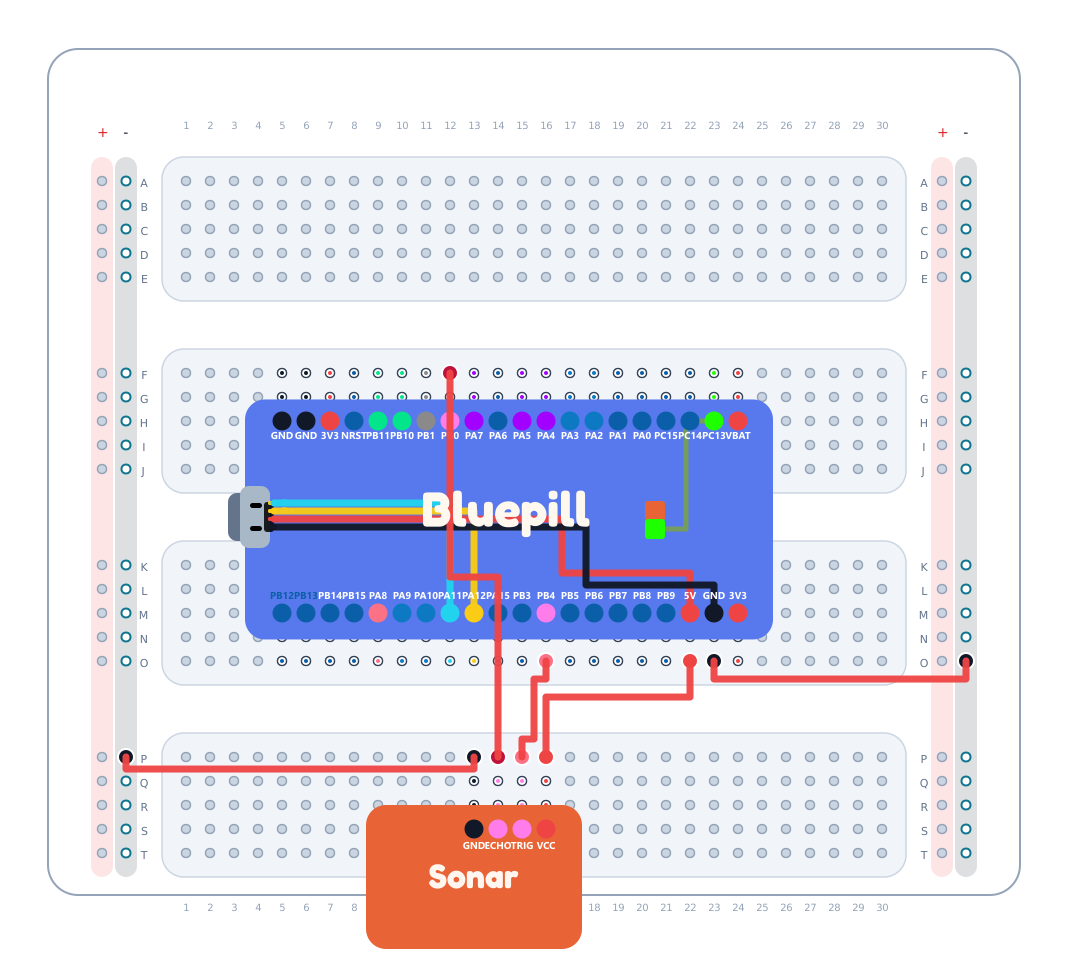
Hidden strips connect holes, and side rails carry power.
Check layouts before building on a real board.
Follow layouts, then adapt them as your project grows.
Open the jar to test each biscuit, control the board, edit displays, watch sensor readings, save your workspace, and try automation.
Pick a scene, drag trigger and action ideas into rules, then test distance, tilt, timer, and feed reactions in a playful browser world.
Choose a scene, make simple rules, and test how sensors, time, words, and board actions can change what happens next.
Browse lessons, device guides, teacher notes, and the web app guide whenever you want extra help or a deeper explanation.
Meet the main parts of your setup through photo cards, then jump straight into the matching device guides.
Plan the real breadboard before you wire it. Place biscuits, inspect connected strips and rails, then draw the lesson wiring visually.
Update your board from the browser when it is in update mode, without needing to open a terminal.
Connect your Bluepill board over USB, then open the Biscuit Jar when you are ready to try the parts.
Use Clock, LED, and LED Matrix first so you can quickly check that your board is alive and responding.
Open the first lesson to begin the guided course flow through docs, wiring, and live tools.
Open the Docs Library when you want help, or open the Board Updater when your board needs a new firmware image.